Every keyword clustering tool will hand you groups. The question nobody answers is whether those groups are right — and whether the tool quietly threw away half your list on the way there.
So I stopped reading feature tables and ran a test. One list of 197 real keywords from a single niche, pasted into every clustering tool with a free tier I could reach without a credit card. Same input, same day, same measurements: how many clusters came back, how many of my keywords actually survived, how long it took, and what the groups were called.
Three tools completed the run. One demanded a signup before it would show me anything. Three more could not be tested at all. And of the three that finished, two silently dropped between 21% and 49% of the list — the failure mode no pricing page mentions.
One disclosure before anything else, because this article ranks our own tool first: UNmiss makes one of the tools below. Discount our opinion accordingly. That is exactly why the section on our tool leads with what it gets wrong, why there is a whole section on the clustering method we do not use, and why the numbers include the 73 keywords our own tool dropped before we caught them.
For a free cluster map with no account and nothing thrown away, use the UNmiss Keyword Cluster Tool — it placed all 197 keywords, tags intent per keyword, and exports JSON and CSV. For the fastest free run and the most granular free groups, KeySearch. For the largest free capacity, PEMAVOR — but expect to sort the leftovers yourself. And if cluster accuracy is what you are actually buying, the honest answer is a SERP-based tool: Keyword Insights from $58/month, or Keyword Cupid from $9.99. None of the free semantic tools, ours included, look at a single search result.
That middle number is the one worth sitting with. A clustering tool exists to turn a keyword dump into a content plan. A tool that hands back 96 of your 197 keywords in a bucket labelled "Not Clustered" has not done the job — it has renamed it.
Our tool primarily focuses on semantic relevance so the keywords within each cluster are closely related in meaning and context.
— KeySearch, on its own free clustering toolThat sentence is honest and it is also the whole limitation of the free tier of this category, ours included. Semantic relevance is not the same thing as ranking in the same place, and the gap between those two ideas is where most cluster maps quietly go wrong.
How I tested: one list, seven tools
The list was 197 keywords about home espresso — machines, grinders, brewing technique, milk, maintenance, beans, water, troubleshooting and accessories. Deliberately ordinary, and deliberately full of traps: pairs that read almost identically but serve different intents ("descale espresso machine" versus "best descaling solution"), and pairs that read differently but belong together ("why is my espresso sour" and "espresso running too fast").
Every tool got the identical text, pasted into whatever box it offered, with default settings. For each one I recorded five things:
- Did it finish? Without an account, a card, or an email.
- How many clusters came back.
- Coverage — how many of my 197 keywords actually appear in the output. This is the number nobody publishes and the one that matters most.
- Time to result, wall clock.
- What the clusters were called, because a cluster named "how to" is not a content plan.
Coverage is measured against the input, not against the tool's own summary. Several tools report a healthy-looking count that includes keywords they invented, while the ones you submitted are missing.
The results at a glance
| Tool | Finished free? | Clusters | Coverage of 197 | Time |
|---|---|---|---|---|
| UNmiss | Yes, no account | 7 | 197 / 197 | 30s |
| KeySearch | Yes, no account | 29 | 155 / 197 (42 missing) | 3s |
| PEMAVOR | Yes, no account | 13 + "Not Clustered" | 101 grouped (96 unclustered) | 18s |
| Topical Map AI | No — signup required to view | — | — | — |
| Zenbrief | Did not complete in testing | — | — | — |
| InstaRank | Did not complete in testing | — | — | — |
| Quattr | No — demo request only | — | — | — |
Two notes on fairness. "Did not complete in testing" means exactly that — those tools may work perfectly in a normal browser session; they did not finish inside my run, and I would rather say so than score them on a guess. And the tools below the line are not bad tools, they are tools I could not measure, which is a different claim.
The best keyword cluster tools, ranked
1. UNmiss Keyword Cluster Tool — best free, and the only one that kept every keyword
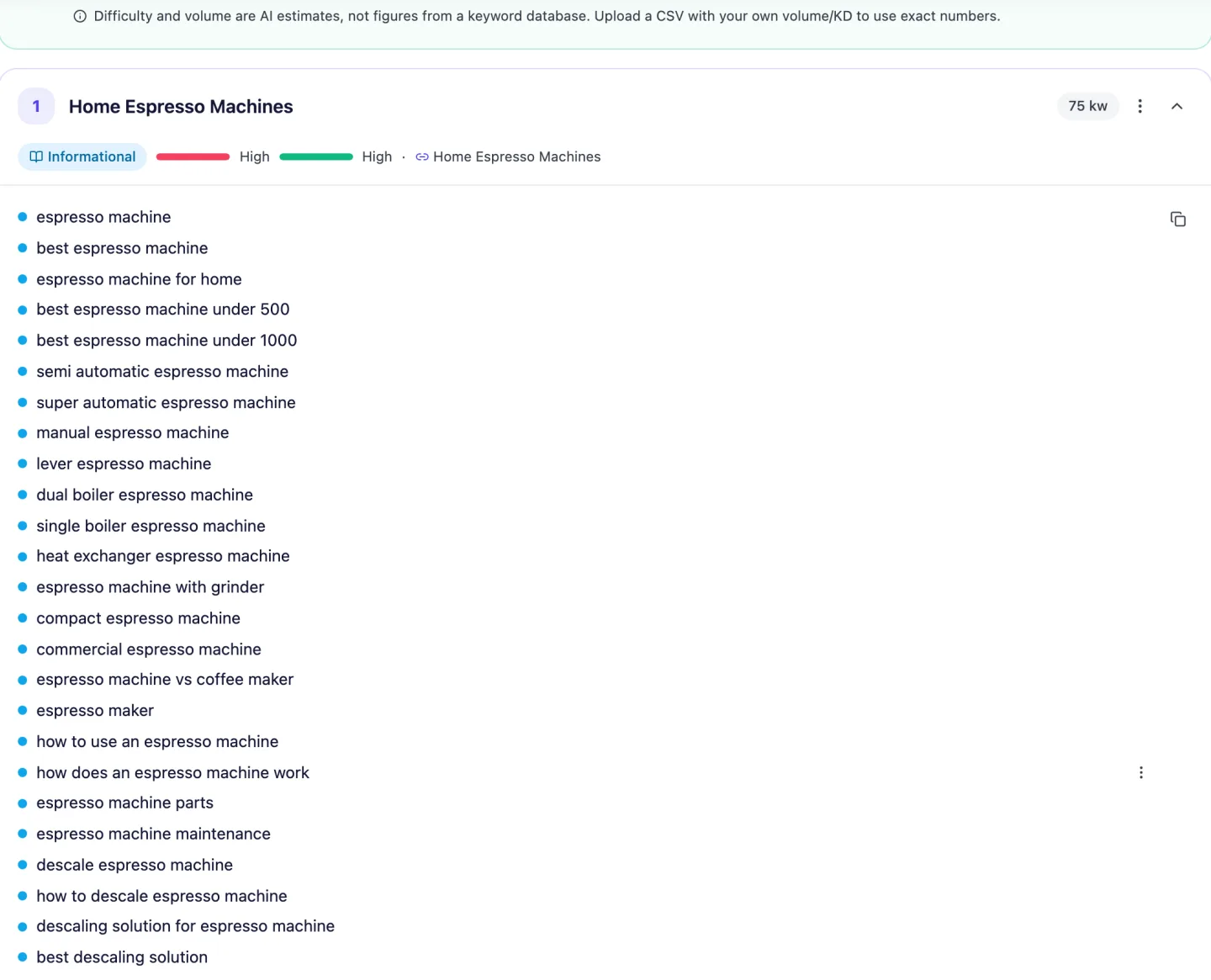
The UNmiss Keyword Cluster Tool is free with no account, no email and no card, at 2 full runs a day. It returned 7 clusters in 30 seconds and — this is the part that separates it — every one of the 197 keywords I submitted appears in the output.
That did not happen by accident, and the story is not flattering. While building this test I discovered our own tool was timing out at 80 keywords and silently discarding input above a hidden character cap. Worse, the language model behind it was quietly omitting keywords on every single run — 73 of 197 on the final run, 37% of the list — with nothing putting them back. We fixed all of it before publishing: the cap, the timeout, and a reconciliation step that returns any dropped keyword to the cluster it best matches. The 197/197 above is the result of that fix, not of the tool having always been good.
Beyond coverage, you get per-keyword intent tagging (not just one label per cluster), a cannibalization check, a gap analysis, a content brief per cluster, manual cluster editing with undo, exports as JSON, CSV per cluster and CSV per keyword, and 14 output languages.
- Only tool tested that placed 100% of the input
- No account, email or card — 2 full runs a day
- Per-keyword intent, not one label for the whole cluster
- JSON and two CSV shapes, free
- Editable clusters with undo, plus a cannibalization check
- States plainly that its metrics are estimates
- Clusters are too coarse. 197 keywords became 7 groups, two holding 60+ keywords each. That is a topic map, not a content plan — you will be splitting the big ones by hand.
- Cluster-level intent barely discriminates. All 7 clusters came back "informational", in a list containing "best espresso machine under 500" and "buy espresso beans online".
- No SERP data at all — grouping is semantic only
- Volume and difficulty are AI estimates unless you upload your own CSV
- 2 runs a day is tight if you are clustering several projects
2. KeySearch free cluster tool — fastest, and the most granular free output
KeySearch's free clustering tool needs no account and was by far the quickest: 29 topic groups in about 3 seconds. For a tool costing nothing and asking nothing, that is genuinely useful, and 29 groups from 197 keywords is a far more workable starting point than 7.
Two problems. Coverage was 155 of 197 — 42 keywords, 21% of the list, simply are not in the output, with no indication that anything went missing. And the group names are string fragments rather than topics: alongside a sensible "espresso machine" sit clusters called "how to", "why is", "vs flat" and "for espresso". Those tell you the tool matched on shared words, not shared meaning, and they are not headings you can hand to a writer.
- Fastest result of anything tested — roughly 3 seconds
- No account, no email
- 29 groups is granular enough to plan against
- 21% of submitted keywords missing, silently
- Cluster names are word fragments ("how to", "why is")
- No intent labels, no metrics, no export on the free tool
- Clearly positioned to move you to a paid KeySearch account
3. PEMAVOR Keyword Grouping Tool — biggest free capacity, half the list left behind
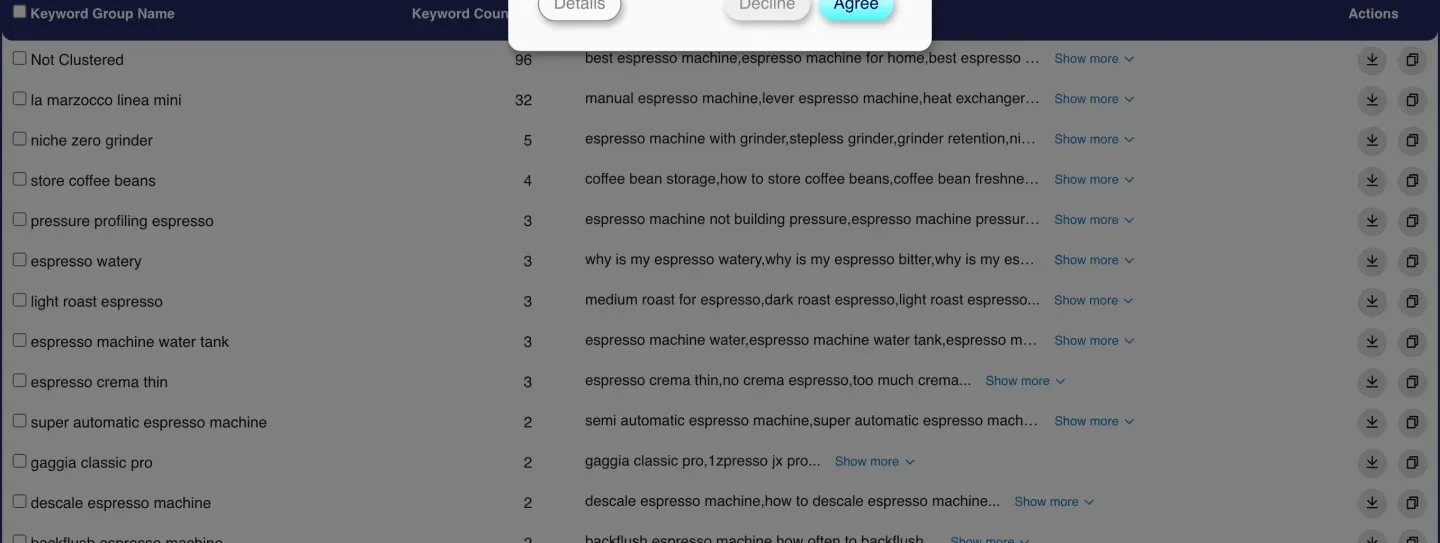
PEMAVOR is the most generous free tier here on paper: no signup, and it advertises up to 10,000 keywords per run. It processed all 197 lines in 18 seconds and produced a clean, exportable table with per-group counts, downloads and a search box.
Then you read the first row. "Not Clustered — 96." Just under half the list came back ungrouped. The groups it did build are named after whichever keyword anchored them — "la marzocco linea mini" (32 keywords), "niche zero grinder" (5), "store coffee beans" (4) — so a brand model name ends up as the label for a cluster mostly about machine types.
To be fair to PEMAVOR: it is honest about what happened. Nothing is hidden, the unclustered bucket is right there at the top, and for a PPC workflow — its actual heritage — grouping the obvious and flagging the rest is a defensible design. For building a content plan it means half the work is still in front of you.
- No signup, and up to 10,000 keywords advertised
- Shows exactly what it failed to cluster instead of hiding it
- CSV download and clipboard copy, free
- Accepts volume metrics alongside keywords
- 49% of the list returned as "Not Clustered"
- Groups named after a single member keyword, not the topic
- Built for PPC grouping; content planning is not the target use
- No intent labels
4. Keyword Insights — the accuracy benchmark, and it is not free
Keyword Insights is the tool the rest of this category is measured against, because it clusters on live SERP overlap: it looks at who actually ranks for each keyword and groups terms whose results genuinely converge. That is a different and better question than "do these words look similar".
Pricing, read from its own page: Basic $58/month for 10,000 credits, Professional $99/month for 20,000, Enterprise custom. Clustering costs 1 credit per keyword, so my 197-keyword list is 197 credits — trivial against either plan. There is a $1 seven-day trial with 5,000 one-time credits, which is the cheapest way to see SERP-based clustering next to whatever you are using now.
I did not run it for this test, because the comparison was explicitly about tools reachable without payment. It is listed here on price and documented method rather than on a measurement of mine, and I would rather label that clearly than pretend otherwise.
5. Keyword Cupid — SERP-based at the lowest entry price
Keyword Cupid also clusters on SERP data and starts at $9.99/month (Starter, up to 2,000 keywords per report, 500 monthly credits), rising through Freelancer $49.99 (20,000 per report), Agency $149.99 (40,000) and Enterprise $499.99 (80,000). No free trial is advertised on the pricing page.
For a solo site owner who wants the SERP-based method without a $58 floor, Starter is the cheapest legitimate door into it. Again — priced from its own page, not tested here.
6. Semrush and SE Ranking — clustering inside a suite you already pay for
If you already have a suite subscription, you may not need another tool. Semrush's Keyword Manager groups and prioritises keywords inside Semrush Pro at $139/month, and SE Ranking's keyword grouper sits inside Core at $129/month — both read from their own pricing pages on 7 August 2026 while researching what a full SEO stack actually costs.
Nobody should buy either for clustering. If you already pay, use what you have before adding a seventh subscription.
7. Topical Map AI — a free tool that is not free to see
Topical Map AI advertises AI clustering of 1,000+ keywords in 60 seconds with no signup. I pasted the list, ran it, and the result was a "Signup Required" gate: the clustering may well have happened, but viewing it needs a free account. That is a legitimate business model and a reasonable trade — it is simply not the same product as the ones above, and a reader deciding where to paste a list deserves to know before they paste it.
8. Zenbrief, InstaRank and Quattr — could not be measured
Zenbrief and InstaRank both present a proper keyword box and a run button, and neither completed inside my test window. Quattr's free clustering page offers a demo request rather than a tool. I am not scoring any of the three: the honest result is "not measured", and I would rather leave a gap than fill it with an assumption.
SERP overlap vs semantic clustering: the difference that decides accuracy
This is the section that should change how you read every ranking above, including ours.
There are two ways to decide whether two keywords belong together.
Semantic clustering asks whether the words mean similar things. A language model or an embedding compares the phrases and groups the ones that read alike. It is fast, cheap, works offline from any search engine, and is what every free tool in this article uses — ours included.
SERP-overlap clustering asks a different question: when someone actually searches these two phrases, does Google return the same pages? If the top results converge, one page can rank for both, and they belong in one cluster. If they do not, they need separate pages no matter how similar they read.
The second method is more accurate, and it is not close. Independent testing of this category scores SERP-based tools well above LLM-based ones, for a specific and demonstrable reason: meaning and ranking are not the same signal.
My own list is full of examples. "Descale espresso machine" and "best descaling solution" are semantically near-identical — one is the task, one is the product for it. Every semantic tool in this test filed them together. But one of those searches returns tutorials and the other returns shopping results, which means they need two different pages. A SERP-based tool separates them automatically. A semantic tool cannot, because from a language model's point of view they are the same topic.
The reverse trap is just as common. "Why is my espresso sour" and "espresso running too fast" share almost no vocabulary, but they are the same problem with the same fix, and the same page ranks for both. Semantic clustering splits them; SERP clustering merges them.
So the honest hierarchy is this. If cluster accuracy is the thing you are buying, buy a SERP-based tool. If you want a fast, free, no-account way to turn a keyword dump into a first-draft topic map that a human then edits, a semantic tool does that well — and among the free semantic tools, the one that does not lose your keywords is the one to use.
Where the paid tools genuinely beat us
Four things, named specifically, because a comparison where our own tool has no weaknesses is not a comparison.
| Capability | Who wins | Pay for it if… |
|---|---|---|
| Clustering that reflects real SERPs | Keyword Insights from $58/mo |
You are building a content plan you will spend months executing. Getting the cluster boundaries wrong at the start is the most expensive mistake in the whole process. |
| Scale past a few hundred keywords | Keyword Cupid from $9.99/mo |
You cluster 10,000+ keywords per report. Every free tool here, ours included, is built for lists in the hundreds. |
| Real volume and difficulty | Semrush, SE Ranking | You prioritise clusters by traffic potential. Our numbers are AI estimates and say so; theirs come from a keyword database. You can upload your own CSV to ours, which is the free workaround. |
| Tight, page-sized clusters | Keyword Insights, Keyword Cupid | You want clusters you can hand straight to a writer. Ours produced 7 groups from 197 keywords; a SERP-based tool would produce dozens, sized to one page each. |
Read that as a decision rule, not a scoreboard. If your work lives in that table, the free tier is a starting point and not the answer.
What keyword clustering actually does for rankings
Clustering is not a ranking factor. It is a planning device, and it earns its keep in three ways.
It stops you writing the same page twice. If eight keywords all return the same results, they are one page. Writing eight posts means those pages compete with each other, split their own link equity, and force Google to pick a winner you did not choose. That is keyword cannibalisation, and clustering is the cheapest prevention.
It tells you how long a page needs to be. A cluster of 4 keywords is a focused post. A cluster of 40 is a pillar page with sections, or it is really four clusters wearing a trench coat. Cluster size is the most useful brief input you can hand a writer.
It exposes what you have not covered. Clusters with no matching page on your site are your content gaps, ranked by how many searches feed into them.
How many keywords should a cluster hold?
KeySearch's own guidance — 5 to 15 closely related keywords — matches what most practitioners use, and it is a good sanity check on any tool's output.
By that yardstick, my results are revealing. KeySearch's own 29 groups average about 5 keywords each: right in range. PEMAVOR's clustered portion averages around 8: also fine, if you ignore the 96 it skipped. Our 7 clusters average 28, with two above 60 — well outside it, and the clearest single thing we need to improve.
If a tool hands you a 60-keyword cluster, that is not a page. Split it by intent first, then by subtopic, until each group could plausibly be one URL.
Four mistakes that ruin a cluster map
- Trusting the coverage number the tool shows you. Count your input, count the output, compare. Two of three tools here lost keywords without saying so.
- Treating semantic clusters as final. They are a first draft. Spot-check three or four pairs against a real Google search before you commission anything.
- Ignoring intent inside a cluster. "Best espresso machine under 500" and "how does an espresso machine work" can be semantically adjacent and still need different pages. Per-keyword intent labels help; cluster-level labels mostly do not.
- Planning one page per keyword. The entire point is the opposite. If your cluster map has as many clusters as keywords, the tool has not clustered anything.
What about non-English keywords?
Semantic clustering degrades outside English, because the models behind it have seen far more English. Our tool offers 14 output languages and will detect the input language automatically, but treat a non-English cluster map with more scepticism than an English one — the same caution applies to every semantic tool here.
SERP-based tools have the advantage again: Google's results for a Ukrainian query are Ukrainian results, regardless of what any language model knows.
A workflow that survives the tool's limitations
- Gather more keywords than you think you need — from keyword research, Search Console, and competitor pages. Clustering 40 keywords tells you almost nothing.
- Cluster them, then immediately check coverage: does the output contain every keyword you submitted?
- Split anything over ~15 keywords by intent, then by subtopic, until each group is one plausible page.
- Spot-check the boundaries. Take three pairs the tool grouped and search them. If the top results do not overlap, split them. This is the manual version of what a SERP-based tool automates.
- Assign one URL per cluster, then track them — rank tracking against the cluster's head term tells you whether the boundary was right.
- Every submitted keyword placed, with the count shown
- Per-keyword intent, not one label per cluster
- Cannibalization check and content brief per cluster
- JSON and CSV export, 14 output languages
Frequently asked questions
What is the best keyword cluster tool?
For a free run with no account, the UNmiss Keyword Cluster Tool — it was the only tool tested that placed all 197 submitted keywords, and it tags intent per keyword. For accuracy rather than convenience, a SERP-based tool: Keyword Insights from $58/month or Keyword Cupid from $9.99/month. We make one of these tools, so weigh the ranking accordingly.
Is there a genuinely free keyword clustering tool?
Yes, three of them completed a real run with no account: UNmiss (2 runs a day), KeySearch (fastest, ~3 seconds) and PEMAVOR (largest advertised capacity). Topical Map AI required a signup to view results. Zenbrief, InstaRank and Quattr could not be measured in this test.
Why do clustering tools lose keywords?
Two reasons. Rule-based tools like PEMAVOR park anything that does not meet their grouping threshold in an explicit "Not Clustered" bucket — 96 of my 197. LLM-based tools simply omit keywords from their output, silently: ours dropped 73 of 197 before we added a step that puts them back. Always count the output against your input.
What is SERP-based clustering and why is it better?
It groups keywords by whether Google returns the same pages for them, rather than by whether the phrases mean similar things. It is more accurate because meaning and ranking are different signals — "descale espresso machine" and "best descaling solution" mean nearly the same thing and return completely different results. Keyword Insights and Keyword Cupid both use it; no free tool in this comparison does.
How many keywords should be in one cluster?
Roughly 5 to 15 closely related keywords, which is also KeySearch's own published guidance. Anything much larger is usually several clusters merged. Our tool averaged 28 per cluster on this list with two above 60, which is too coarse and is the main thing we need to improve.
Can I cluster keywords in ChatGPT instead?
You can, and you will get the same class of result as every free semantic tool here — including the same failure mode, where keywords quietly go missing from the response. If you do it that way, count the output. The advantage of a dedicated tool is export, intent labels and repeatability, not smarter grouping.
Does keyword clustering actually improve rankings?
Not directly — it is not a ranking factor. It improves rankings indirectly by stopping you from publishing several competing pages for one set of results, by sizing pages correctly, and by exposing gaps. The mechanism is avoiding cannibalisation, not pleasing an algorithm.
Is this comparison fair, given you make one of these tools?
We make one, so weigh it accordingly. What we offer instead of neutrality is checkability: the same 197-keyword list went into every tool, coverage is measured against that input rather than against each tool's own summary, prices come from vendors' own pages, and the section above names four capabilities where paying more is the right call. The article also publishes that our own tool was timing out at 80 keywords and dropping 37% of the list until we fixed it while writing this. Run your own list and check.
The verdict
If you want a cluster map in the next minute, for free, without handing over an email: use the UNmiss Keyword Cluster Tool and expect to split its larger groups by hand. It is the only free tool tested that gave back every keyword it was given, and losing 21% or 49% of your list is a worse problem than clusters that are too big.
If you want granularity and speed above all, KeySearch's free tool is 29 groups in 3 seconds — just reconcile the 21% it drops. If you are working at PPC scale and are happy to sort leftovers, PEMAVOR takes far more keywords than anything else free.
And if the cluster boundaries genuinely matter — if you are about to commission months of content against them — then none of the free options, ours included, is really the right tool. Spend the $1 on the Keyword Insights trial, cluster the same list with real SERP data, and see how different the map looks. That comparison will tell you more than any roundup, including this one.
Every tool was run on the same 197-keyword list in August 2026. Coverage is measured by counting submitted keywords present in each tool's output. Prices were read from each vendor's own pricing page and change often.