Keyword research is the part of SEO that decides everything after it. Pick the wrong keywords and even great content sinks. Pick the right ones and a small site can outrank a giant.
The stakes are not abstract. In an Ahrefs study of roughly a billion pages, 96.55% of pages got zero traffic from Google. Most content fails not because it is bad, but because nobody was searching for it. A keyword research tool is how you avoid writing into the void.
I tested the 8 best keyword research tools for 2026 — free and paid — the way a normal marketer would use them. I looked at data accuracy, how many real metrics you get (volume, difficulty, intent, CPC, SERP data), how well each one finds long-tail and question keywords, the free tier, and the honest price. Every tool below links to its own site so you can try it yourself.
For most people, UNmiss Keyword Research is the best place to start in 2026, because it shows real search volume, difficulty, intent, CPC and 12-month trends free, with no signup — data most tools put behind a paywall. If you need the deepest database and enterprise features, Semrush and Ahrefs are the strongest paid choices. For a clean budget pick, look at Mangools KWFinder or Ubersuggest.
Two numbers on that list do the heavy lifting. The #1 result earns about 27.6% of clicks while page two gets almost none, so the whole job is finding keywords you can realistically reach page one for. And because the vast majority of keywords are low-volume long-tail terms, a good tool has to surface the specific, winnable phrases — not just the obvious head terms everyone already targets.
“Strong keyword research isn’t about having more data. It’s about asking better questions — matching what you publish to the intent behind the search.”
— Content Anchor, 10 Best Keyword Research Tools (2026)How we tested and chose these tools
There are dozens of keyword tools. To keep this list honest and useful, every tool was judged on the same seven things:
- Data accuracy and source. Is the data from a real commercial database, or a rough estimate?
- Metrics depth. Volume is the bare minimum. Difficulty, intent, CPC, competition, trends and SERP features are what make a decision.
- Long-tail discovery. Can it surface the low-competition, high-intent phrases that actually convert?
- Clustering and workflow. Can you group keywords into topics and move from research to a plan?
- Free tier. How much can you get done without paying — and without an email wall?
- AI-search coverage. A new 2026 axis: does it help you show up in AI answers, not just classic search?
- Value. What you actually get for the entry price.
Every price and limit below was re-checked on each vendor’s own pricing page in August 2026. That matters more than usual this year, because three of these tools quietly restructured their plans and most comparison articles still quote the old numbers.
The 8 best keyword research tools at a glance
| Tool | Best for | Free option | Starts at |
|---|---|---|---|
| UNmiss Keyword Research | Real metrics, free, with no signup | Free, no account | Free |
| Semrush | Mapping a whole topic space in one platform | 10 queries/day | $139/mo |
| Ahrefs | Judging whether a keyword is worth chasing | Free tools + verified-site access | $29/mo |
| Google Keyword Planner | Google-native demand & bid data | Free (Ads account) | Free |
| Moz Keyword Explorer | One clear “is it worth it?” score | Free community account | $49/mo |
| Mangools KWFinder | Local data & readable difficulty on a budget | 5 lookups/24h | $30.50/mo ($18.85 annual) |
| Ubersuggest | Cheapest full suite & lifetime option | 3 searches/day | $29/mo |
| AnswerThePublic | Questions & content angles | 3 searches/day | $20/mo |
Entry prices are shown in USD and were checked on each vendor’s own pricing page in August 2026. Three things changed this year that most articles miss: Semrush renamed its plans (the old Pro/Guru/Business tiers are gone), Mangools removed its cheap “Entry” plan, and AnswerThePublic discontinued lifetime plans. Always confirm the current price on the tool’s own site before you buy.
The 8 best keyword research tools, ranked
1. UNmiss Keyword Research: Best Free Tool With Real Data (Our Pick)
Most “free” keyword tools show you a teaser and hide the numbers that matter. UNmiss does the opposite.
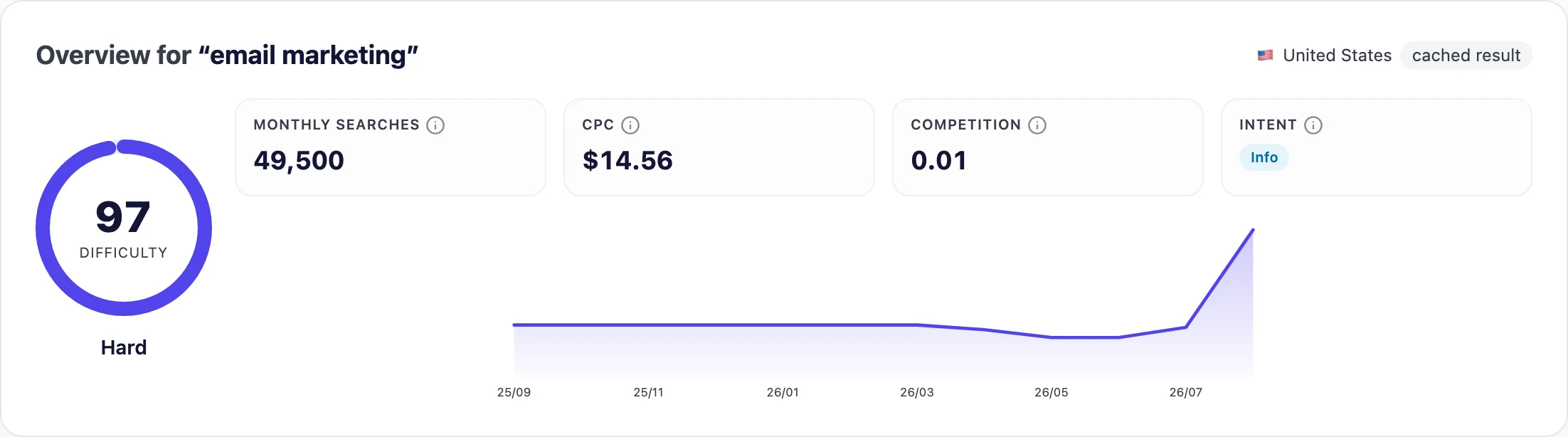
You type a keyword, pick a country, and get the full picture in one screen: a difficulty score, monthly search volume, CPC, competition, search intent, and a 12-month trend line — plus lists of related keywords, ideas, and real questions people ask. There is no signup, no email wall, and no credit card. The data comes from SE Ranking’s commercial keyword database, the same paid dataset that powers the platform’s other tools, so these are real numbers, not local guesses.

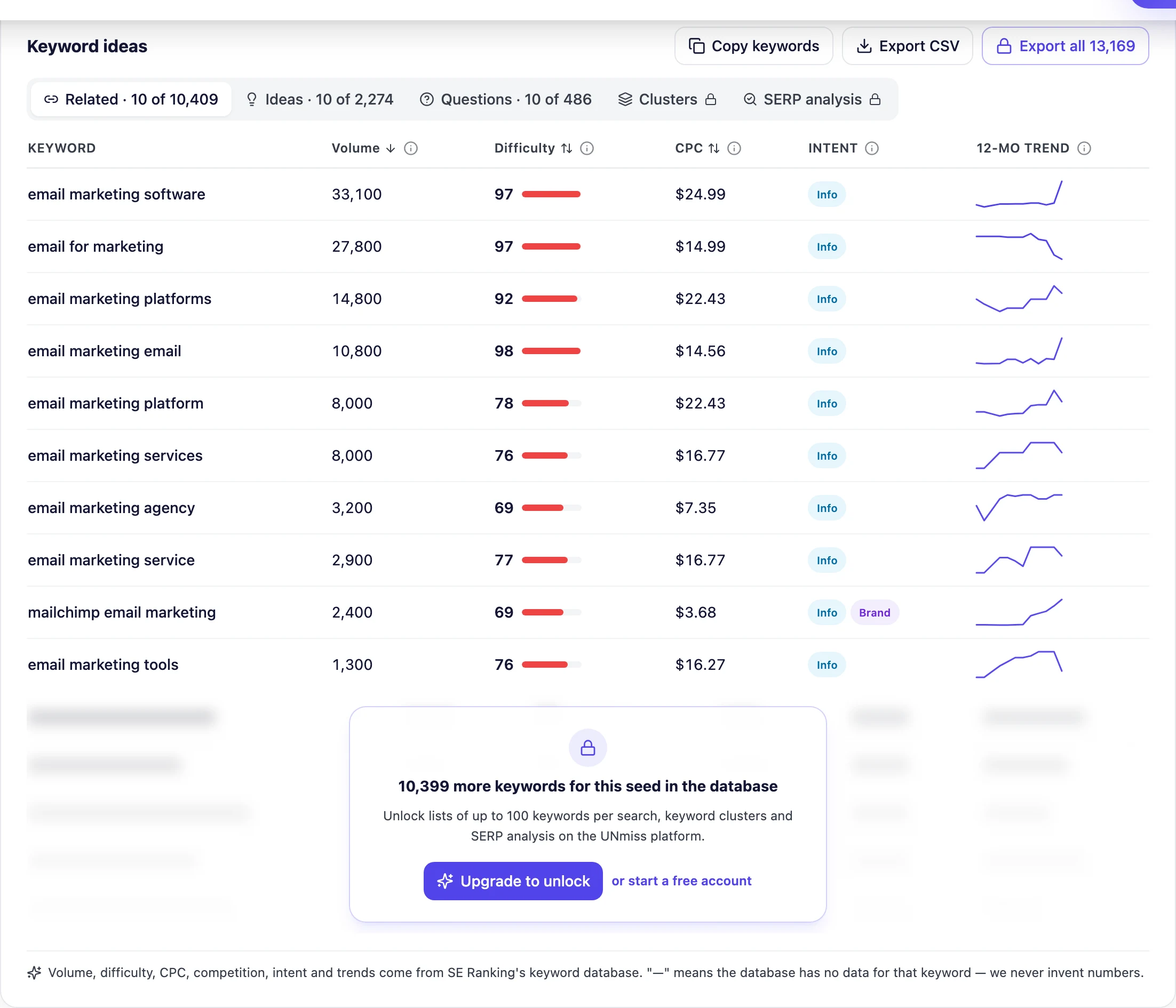
What sells it for a working marketer is the keyword list. Each row has volume, a difficulty bar, CPC, an intent badge, and a mini 12-month trend, and you can sort by any of them and export the whole thing to CSV for free. When a keyword has no data, UNmiss shows a dash instead of a fake zero — a small honesty detail that tells you the numbers you do see are real.
- Real SE Ranking data — volume, difficulty, intent, CPC, competition and 12-month trends
- Completely free, with no signup, email, or credit card
- Related, ideas and question lists, plus 15 country databases
- Free CSV export and one-click copy
- Honest empty states (a dash, never a fake zero)
- The free tool caps searches per day and shows 10 keywords per list — lighter than dedicated suggestion engines
- Keyword clustering and SERP analysis live in the paid UNmiss platform, not the free tool
- Newer brand than Semrush or Ahrefs, with a smaller database than the giants
| Useful feature | Why it matters |
|---|---|
| Full metrics on the free tier | You see difficulty, intent and CPC without paying — the numbers that decide what to write. |
| Search intent per keyword | You match the page you build to what the searcher actually wants. |
| 12-month trend line | You spot rising and seasonal terms before competitors do. |
| Questions list | Real questions become FAQ sections and “AI answer” content. |
| Free CSV export | Move from research to a content plan without retyping anything. |
Best for: anyone who wants real keyword data — volume, difficulty, intent and CPC — without a subscription or a signup.
Not best for: agencies that need thousands of suggestions per search, historical databases, or built-in rank tracking (that is where the big paid suites still lead).
Pricing: the keyword research tool is free. The wider UNmiss platform (audits, AI fixes, AI-search visibility) has a free plan and paid plans from $24/month.
Real search volume, difficulty, intent, CPC and 12-month trends — with no signup, no email wall and no credit card.
- Volume, difficulty, intent & CPC
- 15 country databases
- Related, ideas & question lists
- Free CSV export
2. Semrush: Best for Mapping a Whole Topic Space
Semrush is the industry standard, and the Keyword Magic Tool is the reason why.
It draws on a database of more than 28 billion keywords across 142 regional databases, and returns volume, keyword difficulty, intent, CPC, competitive density, SERP features and questions — with filters deep enough to slice a topic a dozen ways. Add Keyword Gap (what competitors rank for and you don’t), position tracking, and its AI-search visibility features, and you have the most complete research workflow on this list. The trade-offs are price and complexity.
In practice, you type a seed, pick a country database, and the left rail immediately fills with keyword groups — themed buckets you can drill three subgroup levels deep (boots → size → men). Tabs across the top switch between Broad Match, Phrase Match, Exact Match, Related and Questions. Drop your own domain into the filter bar and two extra columns appear: Personal Keyword Difficulty (PKD %), which recalculates difficulty for your site rather than a generic average, and Potential Traffic. Export to XLSX and each group arrives as its own Excel tab, so the structure survives the handoff to a writer.
- Largest index here — 28 billion+ keywords across 142 regional databases
- The groups/subgroups sidebar is the fastest way to see the shape of an entire topic
- PKD % personalises difficulty to your own domain instead of an industry average
- SERP-feature filtering includes AI Overviews, so you can target or avoid them deliberately
- Free account gives 10 queries a day with no payment details required
- Highest entry price of the eight, and the cheapest plan is limited to “basic keyword research”
- One user seat on every plan; extra users cost more on top
- The volume of columns, filters and tabs is a genuine learning curve on day one
| Useful feature | Why it matters |
|---|---|
| Keyword groups sidebar | Auto-clusters one seed into themed subgroups three levels deep, so topic mapping takes minutes. |
| Personal Keyword Difficulty | Recalculates difficulty against your own domain instead of a generic industry average. |
| SERP features filter | Isolate keywords triggering AI Overviews, People Also Ask or local packs before you commit. |
| Keyword Strategy Builder | Push a selected list straight into a clustered content plan without re-exporting anything. |
| Grouped XLSX export | Keeps your subgroups as separate Excel tabs, so the structure survives the handoff. |
Best for: in-house SEO teams and agencies who need to map an entire topic space in one platform.
Not best for: solo bloggers and single-site owners — the entry plan buys only basic keyword research, and one seat.
Pricing: free account with 10 queries a day (no card needed). Paid plans start at $139/month for the SEO plan, or $117.33/month billed annually, plus a 7-day trial. Note that Semrush renamed its tiers in 2026 — the old Pro, Guru and Business plans no longer exist.
3. Ahrefs: Best for Judging What’s Actually Worth Chasing
Ahrefs is the tool professionals reach for when the job is competitive.
Keywords Explorer returns volume, a well-regarded Keyword Difficulty score, clicks, intent and a full SERP overview — but its signature moves are Traffic Potential and Parent Topic. Instead of chasing one keyword’s volume, Ahrefs shows the total traffic a topic can realistically earn and groups related terms into a single target automatically. Ahrefs also runs the strongest free, no-login keyword tools of any brand here.
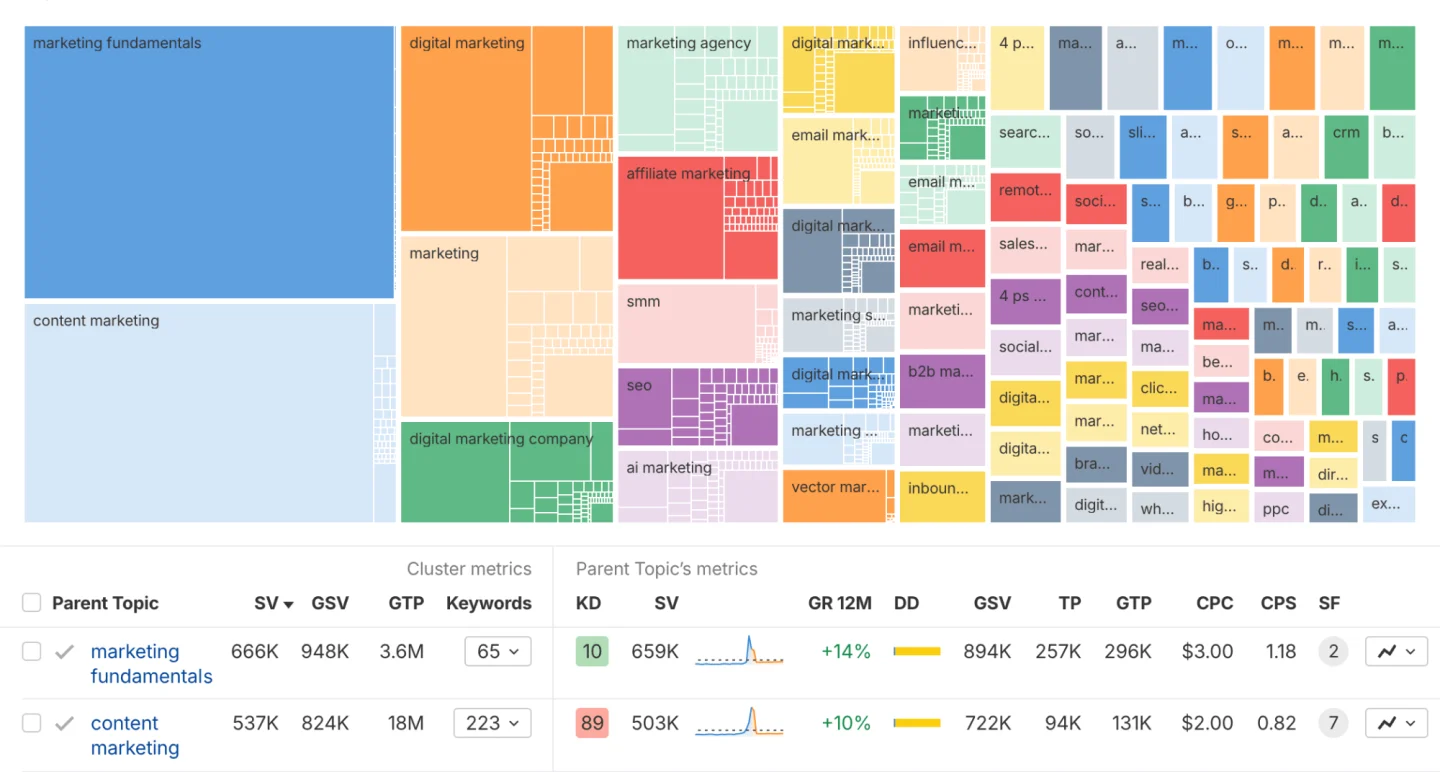
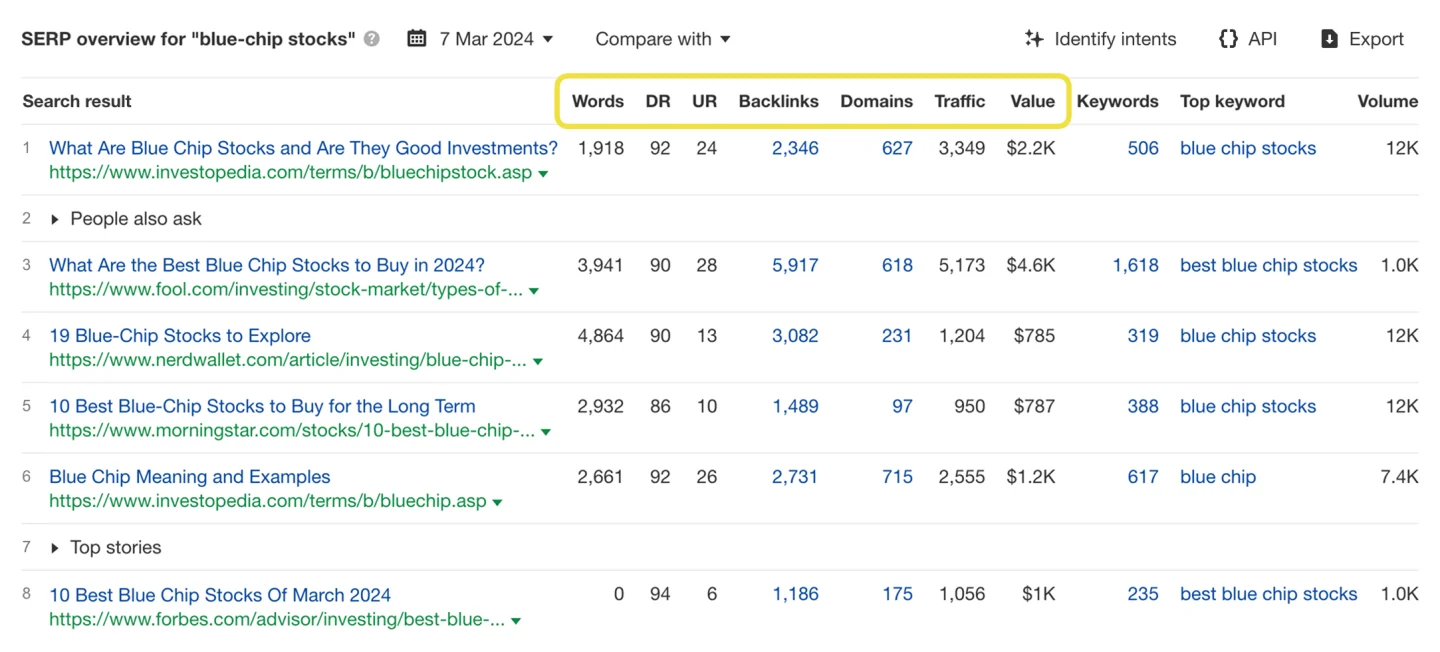
Enter up to ten seeds and the report opens on an overview: Keyword Difficulty, volume split by mobile and desktop, clicks, CPC and global volume — plus Traffic Potential, which shows what the current #1 page earns from every keyword it ranks for. That is routinely a very different number from your seed’s own volume, and it is the single best “is this actually worth writing?” signal in this list. From the sidebar you move into Matching terms, Related terms and Questions, cluster by Parent Topic, then read the SERP overview: DR, UR, referring domains, estimated traffic and traffic value for every ranking page.
- Traffic Potential is the best “is this worth chasing?” signal of any tool here
- Parent Topic stops you writing three thin pages where one would rank
- Keyword Difficulty is transparently defined — referring domains to the current top pages
- Unusually rich SERP overview: DR, UR, backlinks, estimated traffic and traffic value
- A real $29/month entry plan, plus a genuinely useful free keyword generator
- Credit-metered: the Starter plan gets 200 report credits a month, and a filter change costs one
- No free trial on the main plans, and the step up from Starter is $129/month
- One user included on every tier; extra seats cost meaningfully more
| Useful feature | Why it matters |
|---|---|
| Traffic Potential | Shows what the #1 page actually earns, not just what the single keyword is worth. |
| Parent Topic | Tells you when to target a broader term instead of splitting effort across near-duplicates. |
| Cluster by Parent Topic | Groups hundreds of variants into real topics instantly, with no separate clustering job. |
| SERP overview with traffic value | Backlinks, referring domains and dollar value per result reveal why pages actually rank. |
| Free Keyword Generator | Gives volume and difficulty-filtered ideas across several engines with no paid plan. |
Best for: SEOs who need to judge whether a keyword is genuinely worth chasing — not just how many people type it.
Not best for: budget researchers who work in long exploratory sessions, since every report and filter change burns one of the Starter plan’s 200 monthly credits.
Pricing: Starter is $29/month (monthly billing only), then Lite $129, Standard $249 and Advanced $449. Ahrefs Free is free forever for a site you verify, and the Keyword Generator needs no account at all.
4. Google Keyword Planner: Best Free Google-Native Data
If you want numbers straight from Google, this is the source — and it is genuinely free.
Keyword Planner lives inside Google Ads and returns keyword ideas, historical trends, competition level and top-of-page bid estimates. Because it is built for advertisers, it is unbeatable for commercial intent and PPC planning, and it is the upstream source that the paid tools model their own estimates against.
Getting in means creating a Google Ads account and switching to Expert Mode; the tool then sits under Tools. “Discover new keywords” takes a seed term or a URL and returns average monthly searches, three-month change, year-on-year change, competition and bid ranges. The catch every SEO hits within a minute is that, without meaningful ad spend, volume is reported in wide buckets like 1K–10K rather than a precise figure — so a 1,300-search term and a 9,400-search term look identical. The second mode, “Get search volume and forecasts,” projects clicks, impressions and conversions for a pasted list at a given budget.
- Genuinely free with no plan tier — the only tool here with no paid gate at all
- Data comes from Google’s own ad system, the source other tools model against
- Bid estimates give a commercial-value signal no SEO tool matches directly
- Location, language and network targeting is more granular than most paid tools
- Forecasting projects clicks and conversions at a budget, which no competitor here does
- Volume appears in wide ranges unless the account has real ad spend
- Built for advertisers: no keyword difficulty, no SERP analysis, no competitor keyword data
- Close variants are grouped together, so genuinely different SEO intents get merged
| Useful feature | Why it matters |
|---|---|
| Discover new keywords | Generates ideas from a seed term or a URL using Google’s own query data. |
| Search volume and forecasts | Projects clicks, impressions and conversions for a keyword list at a chosen budget. |
| Top-of-page bid range | The low/high bid estimate is a direct read on a keyword’s commercial value. |
| Location and language targeting | Segment demand exactly the way Google segments it, down to individual regions. |
| Plan saving and sharing | Save, share or launch a keyword set straight into a live campaign. |
Best for: PPC advertisers, and any SEO who wants Google’s own demand and bid data without paying anything.
Not best for: SEOs who need ranking difficulty — there is no difficulty score, no SERP analysis and no backlink data, and precise volumes require ad spend.
Pricing: free. You need a Google Ads account and Expert Mode to reach it, but no ad spend is required for access.
5. Moz Keyword Explorer: Best for One Clear Priority Score
Moz is built around a single, friendly idea: one number that tells you whether a keyword is worth it.
Keyword Explorer opens on a scorecard showing Monthly Volume (as both a range and a single number), Difficulty, Organic CTR, Priority, and Minimum Domain Authority — the authority floor you would realistically need to compete. You also get keyword suggestions with a questions filter, and SERP analysis for the ranking pages.
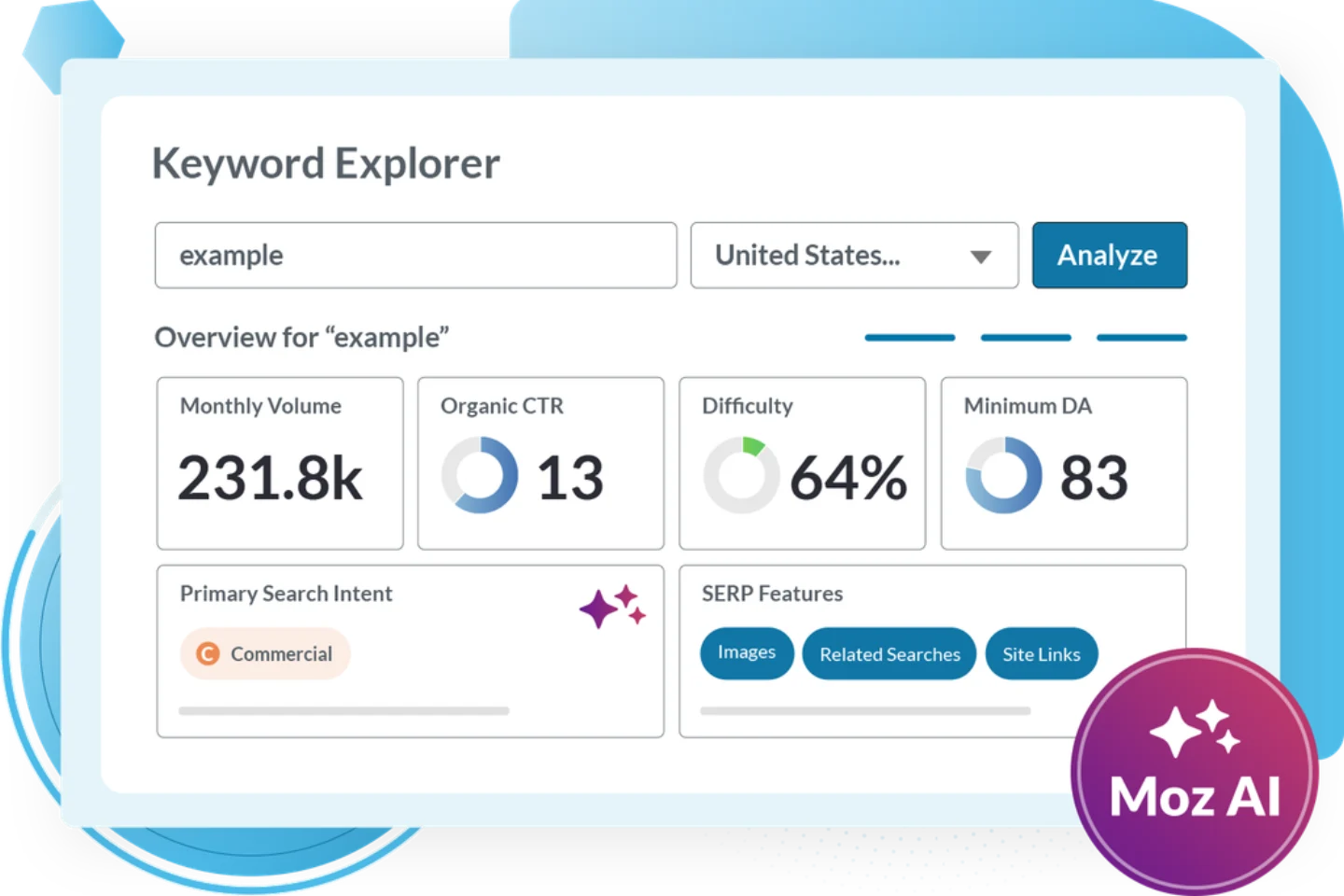
Organic CTR is the metric people remember, because it quietly tells you how much of the click is being eaten by ads and SERP features before organic gets a look in — nothing else in this list quantifies that erosion as directly. Minimum Domain Authority turns “is this winnable?” into a concrete go/no-go threshold, and Explore by Site flips the whole tool around to surface terms you already rank just outside the top 10 for, which is the fastest content-refresh list you can get.
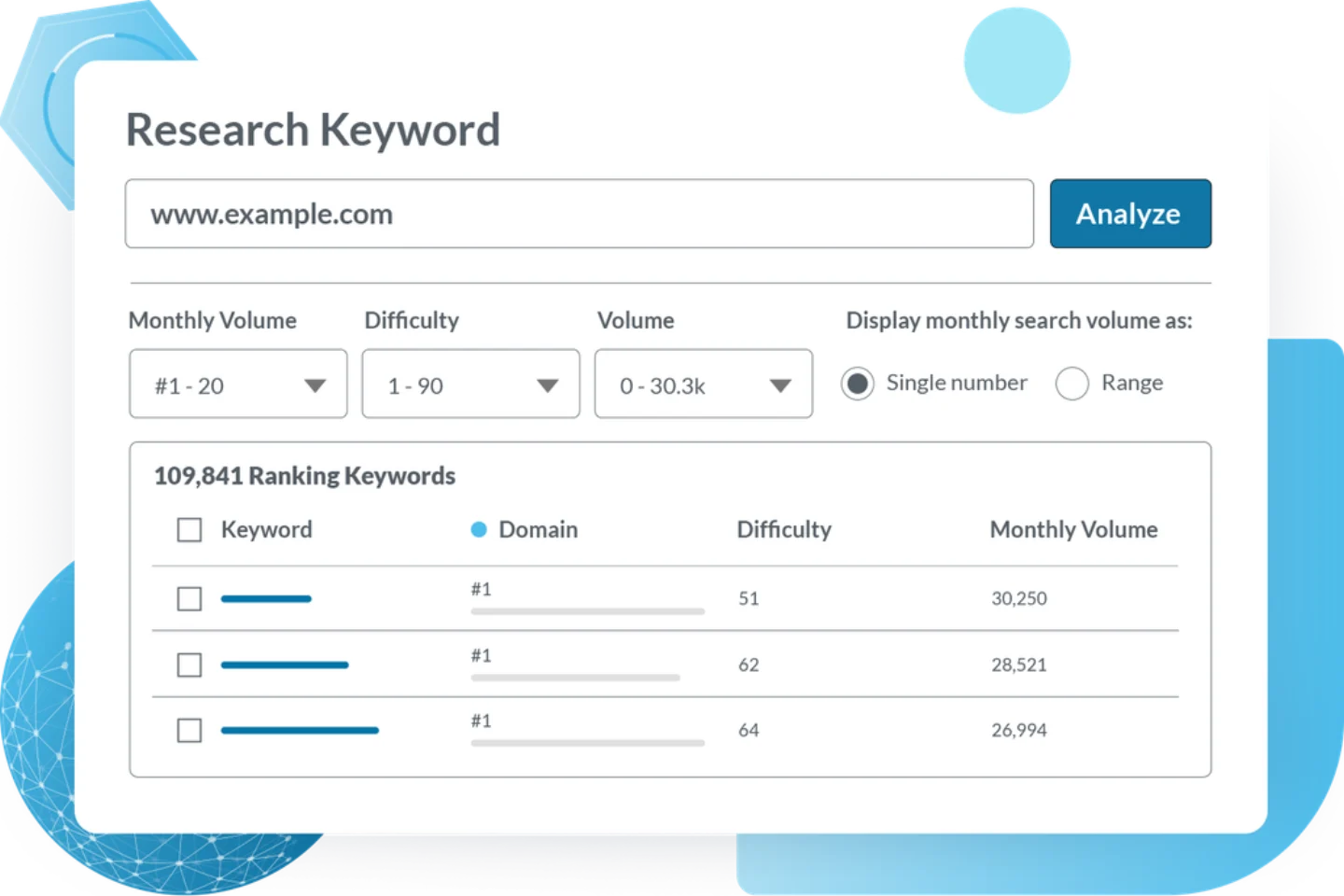
- Priority is the fastest single-number triage of any tool in this list
- Organic CTR is genuinely differentiated — it quantifies SERP click erosion directly
- Minimum Domain Authority turns “can I win this?” into a concrete threshold
- Explore by Site hands you a ready-made refresh list from your near-miss rankings
- The free community account gives permanent Keyword Explorer access with no card
- Query caps are monthly rather than daily, so an entry plan can be spent in one afternoon
- The smallest keyword index among the major paid tools here
- Difficulty, DA and Priority are Moz-specific scores that don’t translate to other tools
| Useful feature | Why it matters |
|---|---|
| Priority score | Folds volume, difficulty and organic CTR into one 0–100 number for fast triage. |
| Organic CTR | Reveals how many clicks survive the ads and SERP features before organic sees any. |
| Minimum Domain Authority | Gives a concrete authority floor, so you know upfront whether you can compete. |
| Explore by Site | Surfaces keywords you already rank just outside the top 10 for — an instant refresh list. |
| Keyword Lists with rank check | Save and tag clusters, add your own relevance score, and check first-page rankings. |
Best for: marketers who want one honest “should I bother?” number, and who care how much traffic actually survives a modern SERP.
Not best for: high-volume researchers — queries are capped per month, not per day, so the cheaper plans run dry quickly.
Pricing: free community account with limited Keyword Explorer access and no card. Moz Pro starts at $49/month for Starter (designed for a single website); Standard is $99/month, or $79/month billed yearly.
6. Mangools KWFinder: Best for Local Data on a Budget
KWFinder is the friendliest “serious data” tool on this list.
It returns exact search volume with a seasonal trend, a trustworthy Keyword Difficulty score, CPC, competitor keywords and localized SERP analysis across tens of thousands of locations. The interface is clean and quick to learn, which is why it is such a common first paid SEO tool, and it comes bundled with four other Mangools tools.
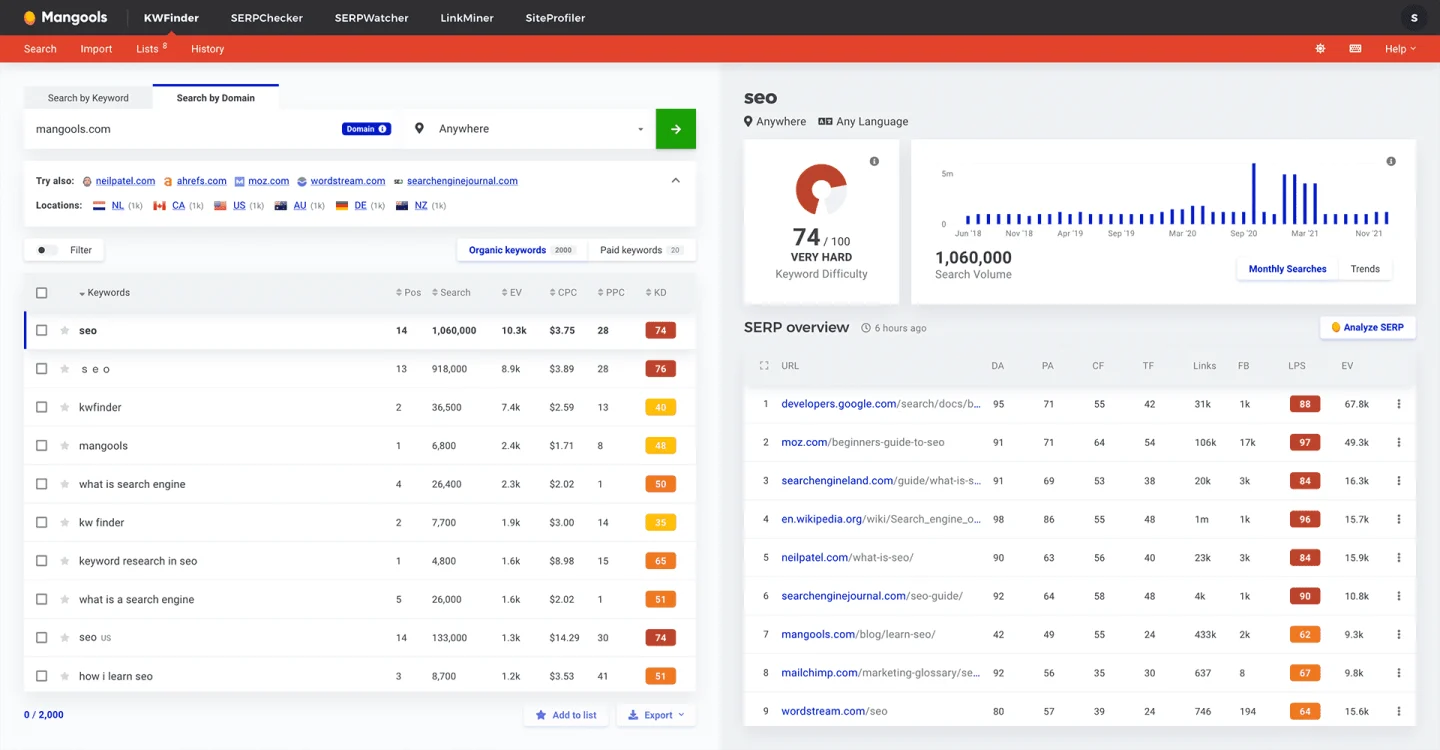
The split screen is what earns its keep. Suggestions sit on the left with Trend, Search, CPC, PPC and KD columns, plus tabs for Related keywords, Autocomplete and Questions. The right side shows a difficulty dial, search volume history going back years, and a SERP overview listing the top 10 with Moz DA and PA next to Majestic-style Citation Flow and Trust Flow — a combination no other tool here puts on one screen. Location targeting reaches city level, so a local business sees real local demand rather than a national average.
- Cheapest full-suite entry among the established paid tools on annual billing
- The only tool here showing Citation Flow and Trust Flow beside Moz DA/PA on one screen
- City-level location targeting gives genuinely local keyword data
- Three suggestion sources — Related, Autocomplete and Questions — as side-by-side tabs
- Years of volume history plus a trends chart for seasonality checks
- Limits are per 24 hours rather than monthly, so a heavy research day hits the wall
- The cheapest plan includes no extra seats at all — any team has to move up a tier
- The index is an order of magnitude behind Semrush and Ahrefs on long-tail coverage
| Useful feature | Why it matters |
|---|---|
| SERP overview panel | DA, PA, Citation Flow, Trust Flow and estimated visits for all ten results at once. |
| Link Profile Strength | One 0–100 score for how hard the current top 10 will be to displace. |
| Relative Keyword Difficulty | Re-scores difficulty against your own site rather than a generic benchmark. |
| Autocomplete and Questions tabs | Three separate idea sources side by side, including live autocomplete pulls. |
| City-level location targeting | Tens of thousands of locations mean local businesses get real local volumes. |
Best for: freelancers and small site owners who want a readable difficulty score and genuine local data without a three-figure monthly bill.
Not best for: agencies running client work at scale — the cheapest plan includes zero extra seats and caps daily lookups.
Pricing: free plan with 5 lookups per 24 hours. Paid starts at $30.50/month for Basic, or $226.20/year — about $18.85/month. Note that Mangools removed its old cheaper “Entry” plan, so the $29 figure still quoted in many articles is out of date.
7. Ubersuggest: Best Budget Pick (With a Lifetime Option)
Ubersuggest, from Neil Patel, is the low-cost entry point to SEO tooling.
It covers the essentials — keyword ideas with volume, SEO difficulty, CPC and seasonal trends, plus content ideas, rank tracking and a light site audit. Its standout is the lifetime licence: pay once instead of subscribing every month, which is rare in this category. The data is not as deep as Ahrefs or Semrush, but for a small site it is often enough.
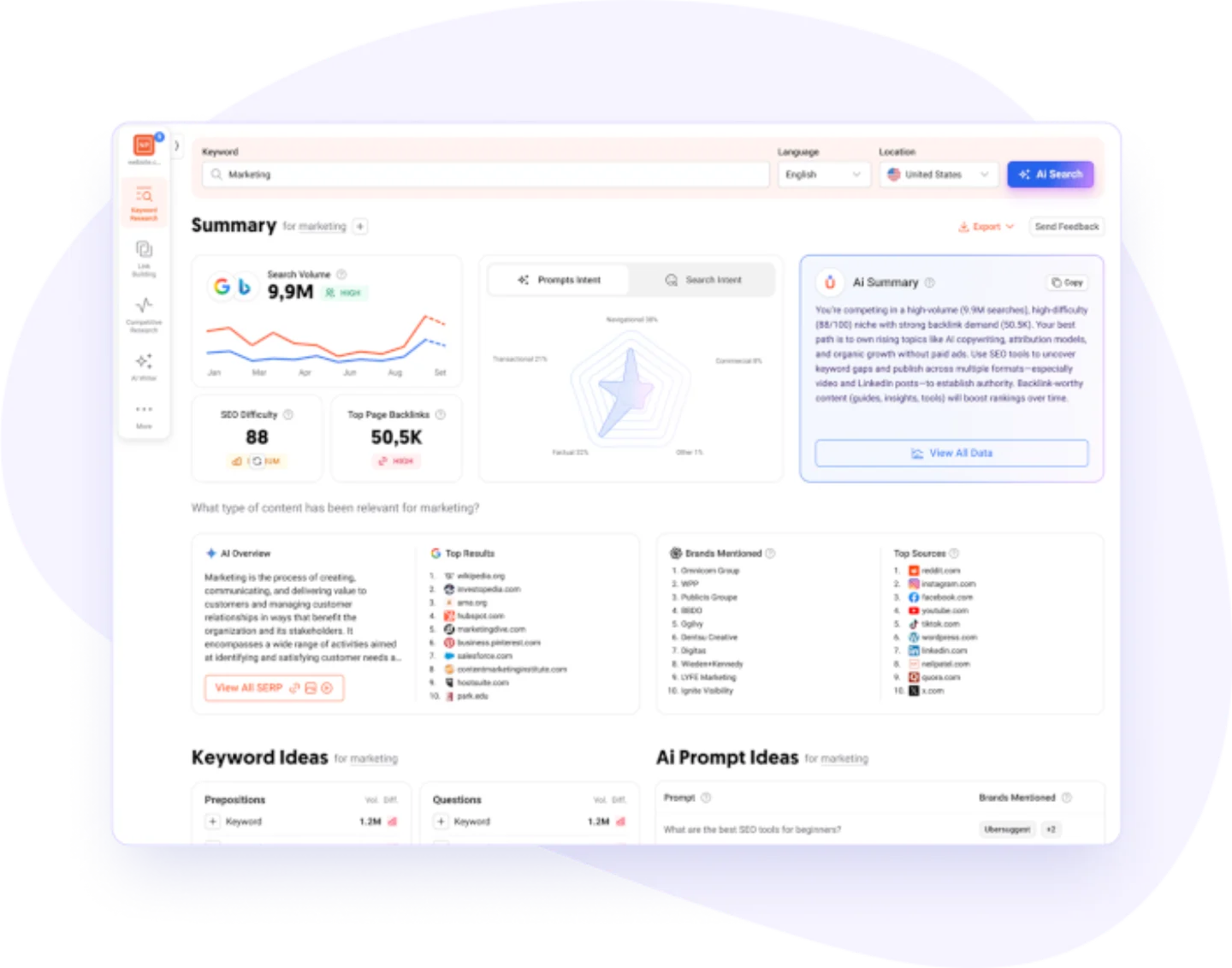
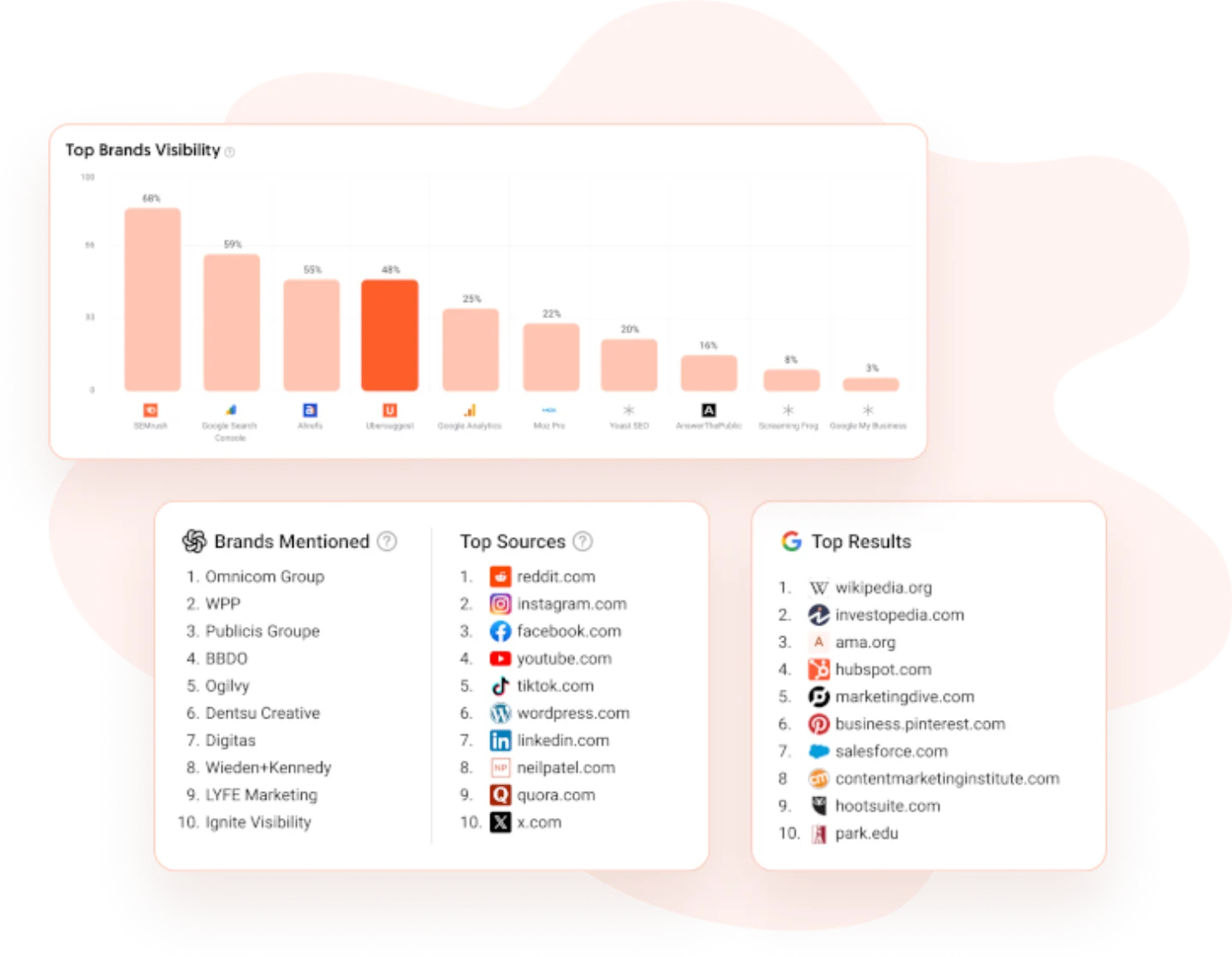
Enter a keyword and the Keyword Ideas report opens on five tabs — Suggestions, Related, Questions, Prepositions and Comparisons — with volume, CPC, SEO Difficulty and Paid Difficulty on every row. Prepositions and Comparisons are the two most rivals bury, and they are where “x vs y” content ideas come from. The mechanic that defines the tool is the “Update Metrics” button: figures can go stale, and refreshing them spends monthly credits, so accuracy is effectively metered.
- By far the cheapest paid entry here, and frequently discounted below list price
- The only tool on this list that sells a lifetime plan — no recurring bill
- Permanent free tier plus a Chrome extension with 40 searches a day
- Five idea tabs including Prepositions and Comparisons that most rivals bury
- A full suite at the price: site audit, rank tracking, backlinks and content ideas
- A far smaller index than Semrush or Ahrefs — long-tail coverage is comparatively thin
- Metrics go stale, and refreshing them costs credits, so accuracy is metered
- Pricing is opaque: a near-permanent countdown discount runs, and lifetime tiers ship fewer features than the equivalent monthly plans
| Useful feature | Why it matters |
|---|---|
| Five-tab keyword ideas | Suggestions, Related, Questions, Prepositions and Comparisons split one seed five ways. |
| SEO and Paid Difficulty | Organic and paid competition on the same row, so you can compare channels. |
| Update Metrics button | Refresh stale numbers on demand rather than acting on a figure from months ago. |
| Chrome extension | 40 searches a day overlaid directly on live Google results, free tier included. |
| Add to rank tracking | Send keywords from research straight into tracking without leaving the report. |
Best for: beginners and budget-bound solo site owners who want a complete SEO suite, not just a keyword tool.
Not best for: anyone doing serious long-tail or competitive research, where the smaller index will simply miss terms the bigger tools return.
Pricing: free tier with 3 searches a day, plus a 40-searches-a-day Chrome extension. Paid list price starts at $29/month for Individual, with lifetime plans available. Ubersuggest runs near-continuous promotional discounts, so the price you see may be lower.
8. AnswerThePublic: Best for Questions and Content Angles
AnswerThePublic is not a volume-and-difficulty engine — it is an idea machine, and a very good one.
Give it a seed keyword and it visualizes the real questions, prepositions and comparisons people search, arranged as its iconic keyword wheel. It is the fastest way to map the questions around a topic, which makes it ideal for FAQ sections, blog angles and the kind of question-led content that AI answers now pull from.
Type one seed and you get a wheel, not a spreadsheet. Spokes fan out into search modifiers — Questions, Prepositions, Comparisons, Alphabeticals, Numbers and Related Terms — so “protein powder” becomes “is protein powder bad for kidneys” and “protein powder vs creatine.” Alongside sit organic searches, People Also Ask, shopping and social data, and an AI Models report covering how people phrase prompts to ChatGPT and Gemini, with intent and sentiment attached. Export as XLSX, CSV or PNG — and the wheel image is the bit that ends up in client decks.
- The keyword wheel genuinely surfaces angles a volume-first tool never shows you
- Covers several platforms beyond Google, including YouTube, Amazon, ChatGPT and Gemini
- Free tier needs no card and gives the full report layout, three searches a day
- Search modifiers break a seed six ways in a single pass
- The AI Models report attaches intent and sentiment to real ChatGPT and Gemini prompts
- No keyword difficulty metric at all, and volume/CPC are limited on the free tier
- Sold by monthly search count — the entry plan is 100 searches a month
- Increasingly bundled with an AI content suite, so part of the price is content generation
| Useful feature | Why it matters |
|---|---|
| Keyword wheels | Visual spokes surface question angles you would never think to type into a volume tool. |
| Search modifiers | Splits one seed into questions, prepositions, comparisons, alphabeticals and more. |
| AI Models report | Shows how people phrase questions to ChatGPT and Gemini, with intent and sentiment. |
| Multi-platform coverage | Pulls from Google, YouTube, Amazon and AI assistants, not just classic search. |
| PNG wheel export | The visualisation drops straight into a client deck without any rebuilding. |
Best for: content and PR teams brainstorming angles and audience questions before anyone opens a volume tool.
Not best for: anyone who needs to prioritise by competition — with no difficulty score and no SERP analysis, it cannot tell you what is actually winnable.
Pricing: free tier with 3 searches a day and no card. Paid starts at $20/month for Starter (100 searches a month), with a 7-day trial on monthly plans. AnswerThePublic’s own help centre states that lifetime plans are no longer offered, despite some pages still listing them.
Where the paid tools genuinely beat us
We put our own tool first, so it is only fair to be specific about where the others win.
- Ahrefs’ Traffic Potential is the strongest “is this worth writing?” signal in this entire list. Nothing else models the total traffic the #1 page earns.
- Moz’s Organic CTR is the only metric here that directly quantifies how much of the click ads and SERP features are taking before organic sees any.
- Mangools’ SERP overview is the only one that puts Citation Flow and Trust Flow next to Moz DA/PA on a single screen.
- Semrush’s keyword groups map an entire topic space faster than anything else, and its index is the largest here.
- Google Keyword Planner is free and upstream — it is the demand and bid source the paid tools model against.
UNmiss wins on a narrower, specific claim: getting real, complete keyword metrics in front of you for free, with no signup. If your job needs the depth above, buy the tool that does it.
Free vs. paid keyword research tools
You do not need to pay on day one. A free tool that shows real metrics will take a small site a long way.
Start free with UNmiss Keyword Research for real volume, difficulty, intent and CPC with no signup; use Google Keyword Planner for Google-native CPC data; use AnswerThePublic to brainstorm questions; and use Ahrefs’ free generator for quick ideas. Between them, that is a complete free workflow.
You move to a paid tool when you need scale and history: thousands of suggestions per search, saved projects, competitor gap analysis, rank tracking, and larger exports. That is when Semrush, Ahrefs, Moz or Mangools start paying for themselves in saved time.
How to choose the right keyword research tool
Match the tool to where you are, not to who is loudest.
- Solo creator or new site: start with UNmiss (free, real data) plus AnswerThePublic for questions. Add Mangools or Ubersuggest when you want more.
- Growing business or in-house SEO: Moz or Mangools for a clean paid workflow; Ahrefs when competitor research becomes the priority.
- Agency or enterprise: Semrush or Ahrefs for the deepest data, gap analysis and reporting at scale.
- PPC-focused: Google Keyword Planner for native CPC and forecasts, paired with a real SEO tool for difficulty.
How to actually do keyword research (a simple workflow)
The tool is only half the job. Here is the workflow the tools above are built to support:
- Seed. Start with a broad term that describes what you do.
- Expand. Pull related keywords, ideas and the questions people ask.
- Filter by intent and difficulty. Keep the terms that match what you can offer and that you can realistically rank for.
- Cluster. Group close keywords into one topic so you build one strong page, not five thin ones.
- Prioritize. Target winnable, high-intent keywords first. Volume is nice; ranking is the point.
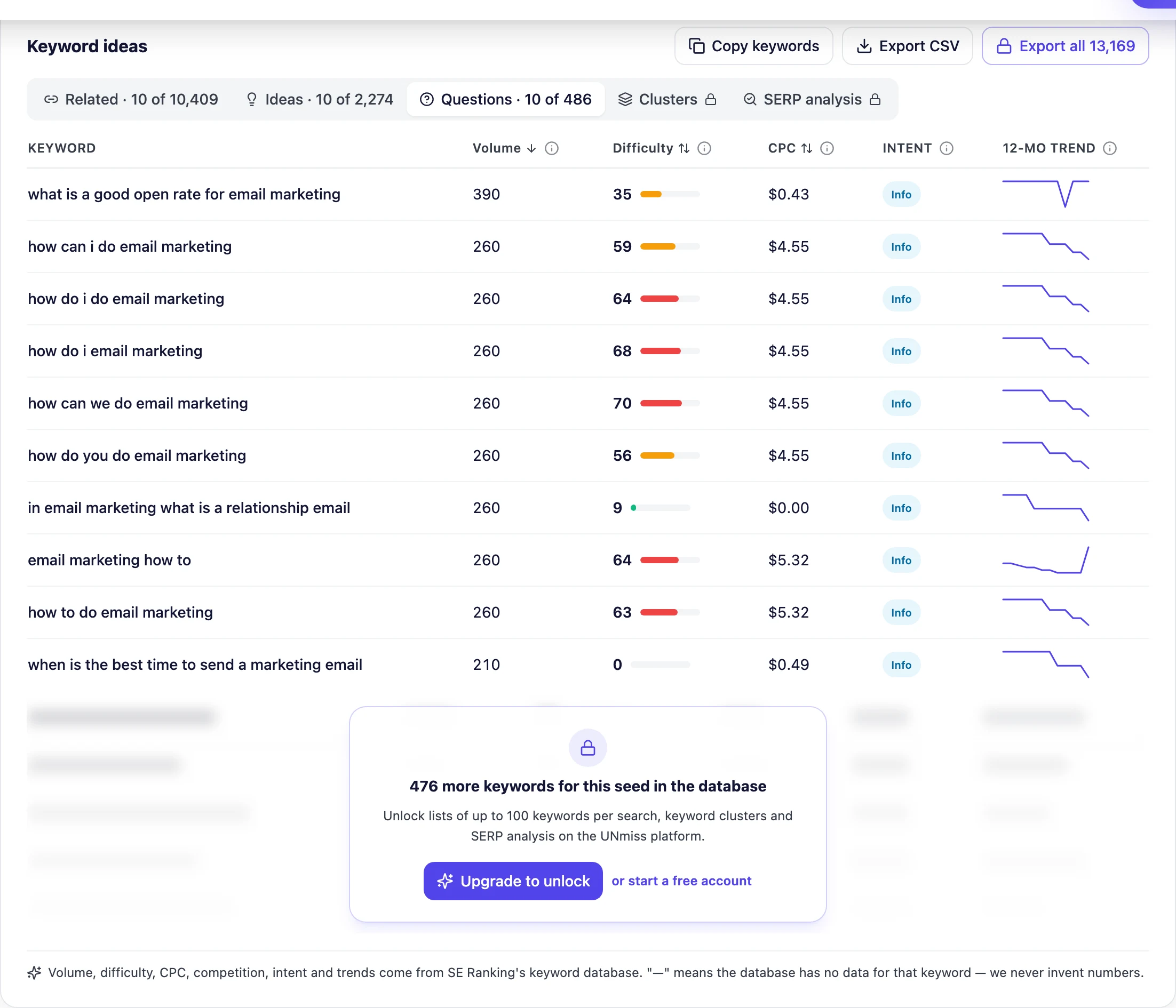
Drop a seed into UNmiss and you get volume, difficulty, intent, CPC and the real questions people ask — in one screen, free.
- Related, ideas & question lists
- Sort by volume, difficulty or CPC
- Real SE Ranking data
- No signup or credit card
Keyword research is no longer only about search volume. The tools that matter now weight intent — what the searcher actually wants — and increasingly track AI-search visibility: whether your brand shows up in ChatGPT, Perplexity and Google AI Overviews. Semrush and Ahrefs both sell this in 2026, and question-led research (the kind AnswerThePublic and UNmiss’s Questions list surface) is exactly what AI answers pull from.
Frequently asked questions
What are the best keyword research tools in 2026?
The strongest all-round paid tools are Semrush and Ahrefs. For real keyword data for free, UNmiss Keyword Research is the best starting point because it shows volume, difficulty, intent and CPC with no signup. Moz, Mangools KWFinder, Ubersuggest, Google Keyword Planner and AnswerThePublic each win for a specific job — clarity, budget, local data, PPC data, or question ideas.
What is the best free keyword research tool?
For real metrics with no account, UNmiss Keyword Research is the best free option — it shows volume, difficulty, intent, CPC and 12-month trends from a commercial database. Google Keyword Planner is the best free source of Google-native CPC data (though volume shows as ranges), and AnswerThePublic is the best free tool for question ideas.
Is Google Keyword Planner free, and is it good for SEO?
Yes, it is free with a Google Ads account. It is excellent for CPC and commercial-intent data straight from Google, but it was built for advertisers: search volume appears as broad ranges unless you run ads, and there is no keyword-difficulty score. Most SEOs pair it with a dedicated tool like UNmiss, Ahrefs or Semrush.
Which keyword research tool is the most accurate?
No tool is perfectly accurate — every volume figure is an estimate — but Ahrefs and Semrush have the largest, most-trusted databases. What matters more is that a tool shows real data and is honest about gaps. UNmiss, for example, shows a dash instead of a fake zero when a keyword has no data, so you know the numbers you do see are real.
Semrush vs Ahrefs — which is better for keyword research?
Both are excellent, and they are good at different things. Semrush's keyword groups map an entire topic space fastest and its index is the largest here. Ahrefs is stronger for judging whether a keyword is worth chasing, thanks to Traffic Potential and Parent Topic clustering. On price, Ahrefs has a real $29/month entry plan while Semrush starts at $139/month.
How much do keyword research tools cost per month?
It ranges from free to enterprise. Free options include UNmiss, Google Keyword Planner and AnswerThePublic. Budget paid tools start around $20–$49/month (AnswerThePublic, Ubersuggest, Mangools, Moz), and the premium suites run $129–$139/month and up (Ahrefs Lite, Semrush). Several tools discount annual billing significantly, and Ubersuggest still sells a lifetime licence.
Can I do keyword research for free without a subscription?
Yes. Use UNmiss Keyword Research for real volume, difficulty, intent and CPC with no signup, Google Keyword Planner for Google-native CPC data, AnswerThePublic for questions, and Ahrefs' free generator for quick ideas. That combination covers a complete workflow at no cost.
What is keyword difficulty, and what score should I target?
Keyword difficulty is a 0–100 estimate of how hard it is to rank on page one, based on the strength of the pages already ranking. Lower is easier. New and small sites should focus on lower-difficulty, high-intent keywords first and earn the harder terms over time. Difficulty is an estimate, so treat it as a guide, not a guarantee — and note that each tool calculates it differently, so scores do not translate between them.
What data should a keyword research tool give me?
At minimum, search volume. To actually make decisions you want difficulty, search intent, CPC and competition, a trend line, and the SERP features on the results page. Question and related-keyword lists help you build complete topics. UNmiss shows all of these on its free tier, which is unusual.
Do I still need keyword tools now that AI answers questions?
More than ever. AI answers are built from the same searches and questions people ask, so knowing which terms and questions have real demand still decides what to create. In 2026, keyword research also increasingly means tracking whether your brand appears in AI answers — a feature Semrush, Ahrefs and UNmiss are all building toward.
The verdict: which keyword research tool should you pick?
Pick the tool that matches how you work.
If you want real keyword data without paying or signing up, start with UNmiss Keyword Research — volume, difficulty, intent, CPC and trends, free. If you need to map an entire topic space in one platform, choose Semrush. If you need to judge what is genuinely worth chasing, choose Ahrefs. For one clear priority score, choose Moz. For local data on a budget, choose Mangools KWFinder. For the cheapest full suite, choose Ubersuggest. For questions and content angles, add AnswerThePublic. And for Google-native CPC data, keep Google Keyword Planner in the mix.
The smart first move for most people is free: run one real search, find a handful of winnable, high-intent keywords, and build the best page on the internet for each one.
Real volume, difficulty, intent, CPC and 12-month trends from a commercial keyword database — free, with no signup.
- 15 country databases
- Questions people actually ask
- Free CSV export
- No email wall
This guide was written and tested by RH Fardin. Tool prices and free-tier limits were verified on each vendor's own pricing page in August 2026 — always confirm the current details on the tool's own site. Last updated August 2026.